
Legal
Delete your data
Delete some or all of your Eplie data at any time, right from the extension. If you can't, email us and we'll do it for you.
Delete my profile data
Removes your profile details, voice brief, imported documents, writing memory and learned rules. Keeps your account, drafts and settings.
Delete my account
Permanently deletes your Eplie account, drafts, settings and personal data.
Ask us by email
Can't sign in, or uninstalled Eplie already? Email support@eplie.com and we'll do it.
Delete only your profile data
- Click the Eplie icon in Chrome's toolbar.
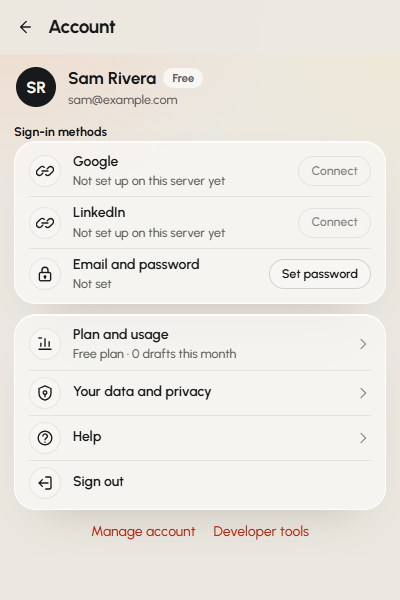
- Click your picture at the top of the popup to open Account.
- Click Your data and privacy.
- Click Delete my profile data, then Delete to confirm.
On the same screen, Download my data saves a copy of your profile details, writing memory and rules first, if you want one.
Delete your whole account
- Click the Eplie icon in Chrome's toolbar.
- Click your picture at the top of the popup to open Account.
- Click Manage account at the bottom.
- Type DELETE, click Delete my account, then confirm.
This can't be undone. You can uninstall the extension afterwards from chrome://extensions.
Ask us to delete it
Email support@eplie.com from the address on your Eplie account, and say whether you want your profile data or your whole account deleted. We may ask you to confirm it's you first.
What happens to your data
- Account information: deleted within 30 days of account deletion, unless the law requires us to keep some of it.
- Profile and voice data: deleted when you delete it or your account.
- Drafts and generated text: deleted when you delete them or your account.
- Post text you chose: used to write that draft and not kept afterwards, apart from short-term technical logs deleted within 30 days.
- Payment records: kept as long as tax and accounting laws require. Paddle keeps its own records under its own policy.
- Support emails: kept up to 2 years after the issue is closed.
Full details are in our Privacy Policy.
Remove Eplie's LinkedIn access
On LinkedIn, go to Settings, Data privacy, then Permitted services, and remove Eplie. That stops Eplie from using your LinkedIn sign-in.