
Comment preferences
Different conversations need different comments
A quick reply to a colleague shouldn't sound like a detailed disagreement with an industry expert.
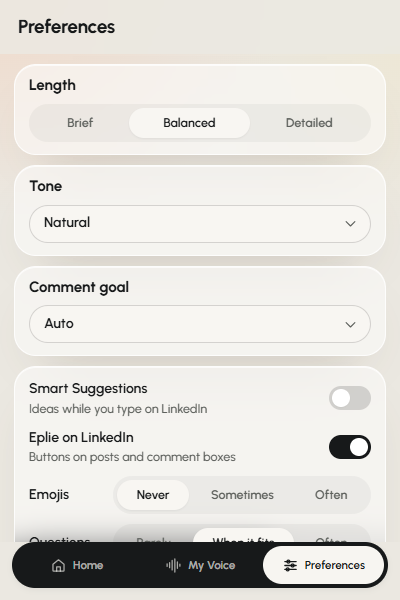
Eplie lets you choose how your comments are written: length, tone, goal, emojis, questions and your own instructions. You don't have to use the same style for every conversation.


Emily Carter · 2nd
Co-founder at Northwind
1h ·
We just reached our first 100 paying customers.

Example. People and posts in these demos are made up.
The problem
One writing style doesn't work everywhere
Imagine commenting on three posts. A colleague announcing a promotion. A founder sharing a product mistake. An industry expert making a claim you disagree with.
You wouldn't answer all three the same way. The promotion needs a short, friendly message. The mistake deserves a practical observation. The argument might need a detailed response explaining your position.
A writing tool with one default style struggles with that. Eplie gives you controls for the kind of comment you want.
Comment length
Say enough without saying too much
A detailed comment isn't automatically better. Choose the length that fits what you have to say. Try all three in the demo at the top of this page.
Brief
Short comments and quick replies, when one clear point is enough.
Balanced
A little explanation without becoming long. The default.
Detailed
Room to explain an argument, share relevant experience or develop a fuller response.
Comment tone
Choose how you want to sound
Use Auto, or pick a tone. Same point, different tone: “Getting website traffic isn't enough if those visitors don't become customers.”
| Tone | How it writes |
|---|---|
| Auto | Matches the tone of the post. |
| Natural | Human and conversational. Never stiff or robotic. |
| Professional | Clear and polished, for more formal discussions. |
| Insightful | Thoughtful, with a considered point. |
| Friendly | Warm and approachable. |
| Supportive | Encouraging, without empty praise. |
| Witty | Light and clever, never forced. |
| Bold | Direct and confident. |
Tone in practice
The same idea, two tones
The central point stays the same; the wording changes to suit the conversation.
Traffic growth is useful, but I'd also measure how much of that traffic converts into qualified leads or customers.
Made-up examples to show the difference in tone.
Comment goal
Decide what you want the comment to do
Leave it on Auto and Eplie decides, or pick a goal.
Add value
Contribute an observation, explanation or practical idea.
Agree & expand
Agree with a point, then take it further instead of repeating it.
Ask a question
Ask something directly related to the discussion.
Share experience
Connect the post to something you've really done. Uses only facts you've approved in My Voice.
Respectfully challenge
Add nuance or push back, with reasons, without starting an argument.
Celebrate
Congratulate someone specifically, not generically.
Emojis and questions
Only when they fit your style
Emojis: Never, Sometimes or Often
Never keeps them out entirely (the default). Sometimes allows the odd one. Often uses them when they fit.
Questions: When it fits, Rarely or Often
Not every comment needs to end with a question. “Did most of the improvement come from onboarding or support?” adds more than “What are your thoughts?”.
Custom instructions
Tell Eplie what you're tired of repeating
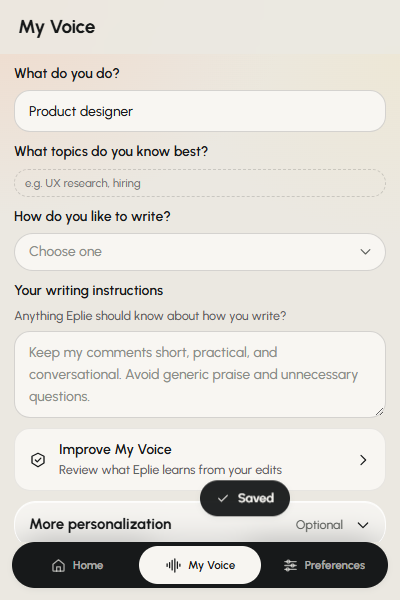
Some preferences don't fit a setting. Write them in your own words, and Eplie follows them every time. For example:
- Use simple English. Keep comments short and direct.
- Don't add generic compliments before making the point.
- Avoid emojis unless I ask for them.
- Don't invent experiences or claims about my work.
- Prefer one specific observation over several general points.
- Don't turn every reply into a question.
Update them as you learn what works for you.
Set your preferences
A few choices before you start commenting
- 1
Open Preferences
Click the Eplie icon in Chrome, then Preferences.
- 2
Choose a length
Brief, Balanced or Detailed.
- 3
Pick a tone
Auto, or the tone you want.
- 4
Choose a goal
Let Eplie decide, or guide the draft.
- 5
Set emojis, questions and instructions
How often each should appear, plus any rules of your own.
Preferences and My Voice
What's the difference?
My Voice
Your background and general writing style. For example, a SaaS marketer who prefers simple, practical comments. See My Voice.
Comment Preferences
How this kind of response should be written. For example, a brief reply that asks a specific question.
Still not right?
Change the draft without starting over
Preferences guide the writing, but they don't guarantee the first draft is right. Too long? Use Shorten. Awkward? Rewrite. Hard to follow? Make clearer. Says something you don't believe? Remove it.
You can also update your preferences to avoid the same problem next time.
Keep exploring
Related features
Write the way you want to write
Short or detailed. Casual or professional. A question, a different opinion, or a useful observation.
I've seen sites grow their traffic without getting more customers. It's worth checking what those visitors actually do.