My Voice personalization
Your LinkedIn comments should sound like you
An SEO specialist, a startup founder and a recruiter shouldn't leave the same comment under every post. They have different experiences, opinions and ways of speaking.
My Voice helps Eplie take those differences into account. Add your background, share examples of how you write, and choose the words and expressions you prefer. You decide how your comments should sound.

 Free
Why generic AI comments happen
AI can't know your experience unless you tell it
Imagine asking an AI tool to write a comment about growing a SaaS business without telling it who you are. It doesn't know whether you're a founder, marketer, developer or investor, or whether you've built a product or only just started learning about the topic.
So it produces a polite, general response. The grammar might be fine, but there isn't much of you in it. That's the problem My Voice is designed to address.
Give Eplie something real to write from
My Voice lets you describe your professional background and the way you prefer to communicate. Eplie uses those settings alongside the LinkedIn post you're responding to, so both the post and your perspective shape the draft. You don't have to explain your background in a new prompt every time.
How My Voice works
Set your preferences once. Change them whenever you need.
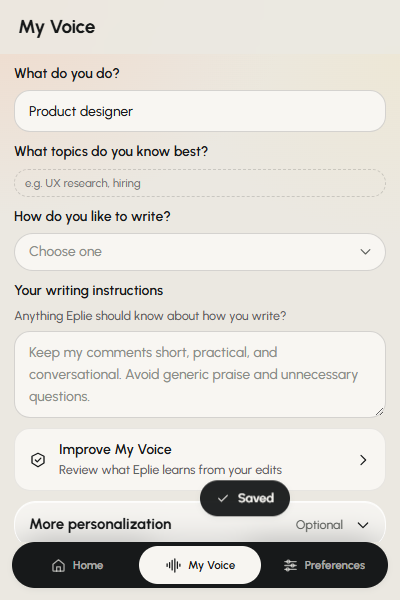
Open the Eplie extension and choose My Voice. Tell Eplie about your work, the topics you know, your writing style and any instructions you want it to follow. You can also add writing samples that show what your normal comments look like.
For example, you might tell Eplie:
I'm a growth marketer working with SaaS companies. I prefer short, practical comments. I use simple English, avoid generic praise, and usually share an example when I have one.
That's more useful than telling an AI to “write something professional”. It explains where you're coming from and what kind of writing you prefer. Update it whenever your work or style changes.
What you can personalize
Seven ways to make drafts yours
Your role and industry
Founder, marketer, developer, recruiter, consultant, salesperson or freelancer. Your role gives the writing a relevant point of view.
Your areas of expertise
A marketer might list SEO, organic growth and SaaS. A developer might list APIs and web performance. They guide what Eplie notices, but they're never proof of experience you haven't had.
Your writing style
Short paragraphs, simple words, conversational, or direct with no compliments. Describe it the way you'd explain it to a person.
Examples of your writing
Three to five comments you wrote yourself show your vocabulary, sentence length and tone. Pick ones that sound like you.
Words to avoid
Overly formal phrases, emojis, sales language, exaggerated praise. List what you never want in your drafts.
Preferred expressions
Maybe you'd say “I've seen this happen” rather than “This is an important insight”. Share the habits that are yours.
Facts about your experience
“I run a small software product.” Real facts you approve, which Eplie may use when relevant. Never fictional credentials.
Same post, different perspectives
Your background changes what you notice
The postWe interviewed 20 customers before making changes to our product. The conversations showed us that our biggest problem wasn't missing features. People couldn't understand how to get started.
“We had a similar lesson while building our product. It's easy to assume people need more features when the first few minutes are already confusing.”
“That onboarding problem affects acquisition too. You can bring in the right visitors, but if they don't understand the product quickly, a lot of that traffic goes nowhere.”
“This is why watching someone use a product tells you more than another survey. People struggle with things the team stopped noticing months ago.”
Made-up examples to show different perspectives, not real Eplie drafts.
No invented experience
Sounding like yourself includes knowing what not to claim
A comment can sound convincing and still be wrong. A draft shouldn't say you've managed a 50-person team unless you have. It shouldn't invent customers, results, qualifications or experiences.
Eplie only uses personal facts you've approved in My Voice, but you should still review every claim. If you have no first-hand experience with a subject, a question or a useful observation may fit better than a personal story.
Eplie helps with wording. Your experience remains your own.
Over time
Your preferences don't have to stay the same
Your writing changes. You may want more concise comments, fewer questions or less formal wording than when you first installed Eplie. Update My Voice whenever you like.
Eplie also has an Improve My Voice area, where you review writing preferences suggested from your edits. Nothing changes until you approve it. One change to a single comment doesn't mean you want every future comment written that way.
My Voice and Comment Preferences
Two kinds of control
My Voice
Who you are and how you generally write. For example: a marketer who prefers clear, casual writing.
Comment Preferences
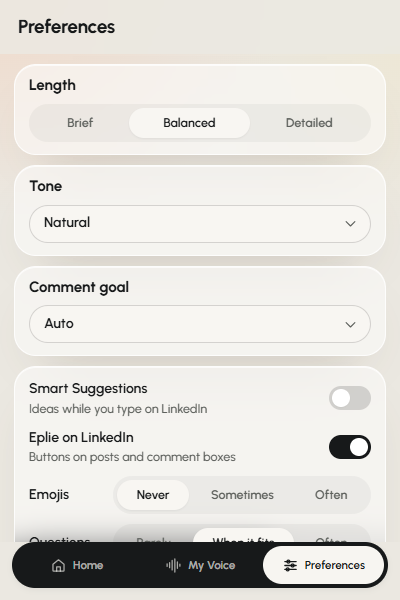
What you want from one conversation: a brief comment here, a detailed respectful challenge there. See Comment Preferences.
Keep exploring
Related features
Stop explaining your writing style from scratch
Tell Eplie what you do, how you write, and what you'd rather avoid. Then use it every time you comment on LinkedIn.