
Context aware comment generation
A good comment starts with reading the post
A comment that fits under every LinkedIn post probably doesn't say much about any of them.
Eplie uses the post you select to prepare a relevant response, so you get a draft based on the discussion in front of you rather than one written with no context.


Daniel Brooks · 1st
Founder at Lumen Labs
5h ·
We changed our onboarding after learning most users never finished the first setup step. Activation improved after we removed two unnecessary screens.
 Repost Send

That first setup step is often where it starts. Were people confused by the instructions, or unsure why they needed that step at all?
Example. People and posts in these demos are made up.
Why context matters
Generic comments miss the reason you wanted to reply
Someone shares an experiment about email marketing. An AI tool writes:
Great insights. This is an important reminder to keep learning and improving.
Someone shares a product launch, and the tool produces another version of the same compliment. Someone describes a hiring mistake, and again the response could fit under almost anything.
These comments aren't offensive or incorrect. They just don't show much understanding of the post. A useful comment responds to a specific argument, example, result or question, and that's hard when the writing tool has nothing to go on.
How Eplie uses the post
Start with the post you're reading
When you click Eplie under a post, it reads that post, at that moment. The post provides the subject; your writing preferences guide the response.
If a post discusses why SaaS companies struggle to convert trial users, a relevant draft could address onboarding, expectations or pricing, whatever the post actually mentions. It shouldn't wander into unrelated advice about gaining followers.
Eplie reads only the post you click. It doesn't scan your feed in the background. Still check the result before publishing, especially on technical subjects or complicated claims.
Comments that add something
Don't just repeat what the author said
We changed our onboarding flow after learning that most users never completed the first setup step. Activation improved after we removed two unnecessary screens.
That first setup step is often where the problem starts. I'd be interested to know whether users were confused by the instructions or simply didn't understand why they needed to complete it.
Made-up example, not a recorded Eplie draft.
Image posts
Sometimes the important information is in the image
People share charts, screenshots and infographics. A caption might say “Interesting results from our latest experiment” while the image holds the actual numbers.
Today, Eplie reads the text of the post. It doesn't look at images, and it's built not to describe media it can't see, so it won't guess what a chart says.
Reading the image in a post, such as the numbers in a chart, is coming. When it arrives, check any numbers or interpretations before you publish: image text can be small, blurry or incomplete.
Post context and thread context
New comments and replies need different information
Imagine a post about hiring remotely, where someone asks whether remote employees get enough support during onboarding. If you're answering them, your reply should be about onboarding, not the general benefits of remote hiring.
A new comment
The original post is the main context. Use the comment generator.
A reply in a thread
The conversation matters too. Use the reply generator, which reads the thread.
Your background adds another layer
The same post can lead to different comments
The postOur customer acquisition cost doubled this year, and we're rethinking every channel.
“How much can we afford to spend on each customer before the numbers stop working?”
“Which channels bring leads that actually convert, not just leads?”
“Are new customers reaching the product's first useful moment?”
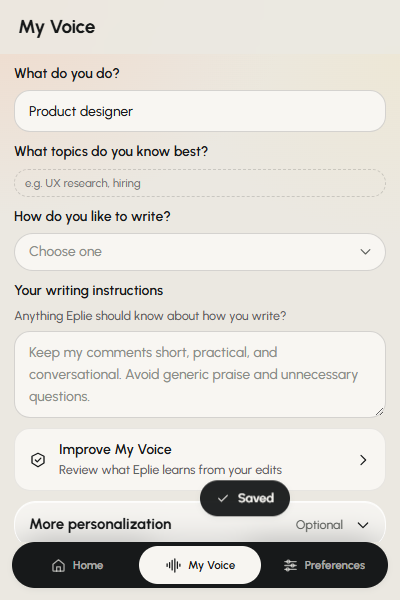
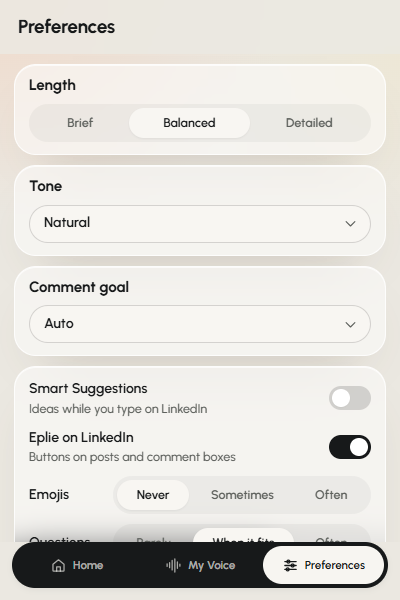
Made-up examples. Eplie combines the post with your role, expertise and comment goal from My Voice and Preferences.
When context matters most
Posts where reading carefully pays off
Detailed arguments
The author makes several points and you want to answer one.
Research and data
Figures and findings that need careful interpretation.
Product and business stories
You want to connect their experience to something you've seen.
Posts you disagree with
Knowing the argument stops you answering something they never said.
Long comment threads
The discussion has moved on and you're answering one person.
Your own posts
People ask different questions; each reply should fit its question.
A more useful comment
Give the draft a direction
Context helps, but it isn't the only thing that matters.
- Have a specific opinion? Write it down first.
- Want a short response? Choose Brief.
- Want to ask something? Choose the Ask a question goal.
- Have relevant experience? Add accurate facts to My Voice.
- Before publishing, check the comment answers what the person said.
Good context doesn't remove the need to think.
Keep exploring
Related features
Comment on what the person actually said
Read the post. Choose your point. Let Eplie help you write it.
Removing unnecessary steps from onboarding is a great way to improve activation.