Everything you need to write better comments
From a blank comment box to something worth saying
Generate a LinkedIn comment in one click. Get suggestions while you write. Reply to whole conversations with context. Or improve your own words without leaving LinkedIn.
Eplie brings it all together in one simple Chrome extension.
Your words, your style, your choice. Eplie never posts for you.
Your comment. Your way.
Some days you need a full draft. Other days, just a little help.
Eplie works with the way you prefer to write.
Feature 01AI LinkedIn comment generator
One click. A comment that actually responds to the post.
You come across an interesting post and have something to add, but figuring out how to start takes longer than it should. You could copy the post into an AI chat, explain what you want, generate, edit and paste it back. Or you could click Eplie.
Eplie uses the post you selected to prepare a comment directly inside LinkedIn, with your writing preferences built in, so you don't explain your tone and style from scratch every time.
What you can do
- Generate a LinkedIn comment with one click.
- Respond to the actual topic of the post.
- Use your professional background and writing preferences.
- Choose the comment length, tone and goal.
- Edit the draft before publishing.
Why it matters: Less time moving between tools, more time in conversations that interest you.
Explore AI comment generation
James Walker · 1st
Product Manager at Fieldnote
3h ·
We stopped quarterly roadmap reviews. Now one engineer joins a customer call every Friday. In two months our backlog changed more than it had all year.

The useful part is what those calls changed. Feedback only matters once it shifts what the team builds next, and a weekly habit makes that hard to ignore.
Example. People and posts in these demos are made up.
Feature 02AI LinkedIn reply generator
Reply to the conversation, not just the original post.
Someone shares an opinion. Another person disagrees. A third asks a question. By the time you want to respond, the conversation has moved beyond the post.
Click Reply under the person you want to answer, then use Eplie. It reads the original post and the thread, and prepares a reply for that conversation. No copying the thread into another tool.
What you can do
- Generate replies inside LinkedIn comment threads.
- Use the original post and the conversation so far.
- Respond to a specific person or question.
- Personalize the reply with My Voice.
- Edit and refine it before publishing.
Why it matters: Less effort collecting context, more attention on what you actually want to say.
Explore contextual replies

Rachel Adams · 2nd
UX Designer at Kettle
8h ·
Hot take: most design systems fail because nobody owns them after launch.

Ownership helps, but I've seen owned systems die too. Teams skip them when the parts don't fit real screens.
Example. The reply answers Daniel, not the original post.
Feature 03My Voice personalization
Your experience. Your words. Your voice.
The problem with many AI comments isn't grammar. It's that they don't sound like the person posting them. A founder, an SEO specialist and a sales consultant read the same post differently, and their comments should show it.
Tell Eplie your role, the topics you know and how you like to write. Want more control? Add writing examples, expressions you use, words you dislike and facts about your experience.
Personalization options
- Your role and areas of expertise
- Preferred writing style and custom instructions
- Examples of your own writing
- Words and phrases to avoid, and expressions you prefer
- Facts about your background, which you approve
- Improve My Voice: preferences suggested from your edits, for you to review
Why it matters: You shouldn't have to explain who you are every time. The goal isn't to invent expertise; it's to help you express what you actually know.
Explore My Voice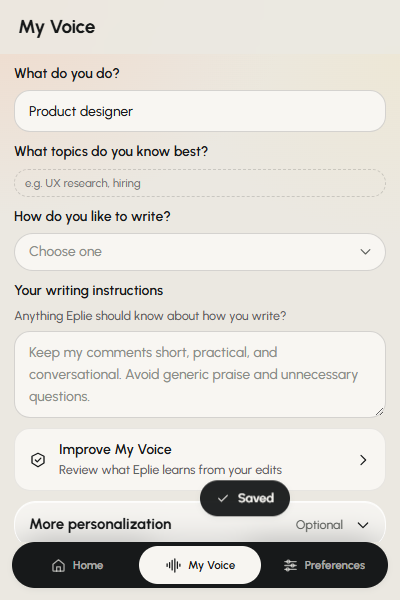
 Free
Feature 04AI comment refiner
Already wrote something? Make it better with one click.
Not every comment needs to be written from scratch. Maybe yours is too long, the wording is awkward, or the point could be clearer.
Eplie's Refine menu, inside LinkedIn's comment box, gives you five ways to improve it, whether you wrote it yourself or Eplie drafted it.
Five ways to refine
- Polish: fix grammar and improve flow.
- Rewrite: say the same thing differently.
- Shorten: keep the important part.
- Make clearer: explain the idea better.
- Professional: more polished and confident, still natural.
Why it matters: Keep the idea you wanted to share without rewriting every sentence by hand.
Explore Comment RefineYour comment
honestly i think we hired our first PM way too late, like way too late, and roadmap meetings basically turned into who ever shouts loudest
 Polish preview
honestly i think wWe hired our first PM way too late, like way too late, and roadmap meetings basically turned into who everwhoever shouts loudest.
Feature 05Smart Suggestions
Keep writing. Eplie helps with what comes next.
You know what you want to say, but you're not sure how to finish the sentence.
When Smart Suggestions is on, Eplie looks at the post and what you've written and suggests a possible continuation in grey. Press Tab when it fits, or ignore it and keep writing. You don't hand over the whole comment.
What makes it useful
- Suggestions appear while you type.
- They use the post and your draft.
- You decide what to accept.
- You keep writing normally.
- Off until you turn it on, and easy to turn off again.
Why it matters: Keep your own writing process, with help when you need it.
Explore Smart SuggestionsFeature 06Finish My Comment Soon
Have half an idea? That's enough to get started.
Maybe your thought is just: “I saw the same thing with SEO. Traffic isn't always the best measure anymore.” You know the point; you haven't worked out how to explain it.
Finish My Comment will turn a rough thought into a clearer comment, using what you wrote and the post. You'll still edit the result so it says what you meant.
What it will do
- Start from a rough idea.
- Turn short notes into a complete comment.
- Use your writing preferences for the wording.
- Let you review the draft before publishing.
Finish My Comment is coming soon. Today, Refine's Rewrite turns a note of a few words into a brief comment.
Why it matters: Your first thought doesn't have to be perfectly written to become a useful comment.
Explore Finish My CommentRachel Adams · 2nd
Head of Growth at Brightpath
2h ·
Our organic traffic doubled this year. Signups barely moved. Here's what we changed next.
Your rough thought
A possible finished comment
I've seen SaaS sites grow organic traffic without much change in signups. Traffic helps, but I'd also check whether those visitors are the right audience and what they do after landing.
Example. People and posts in these demos are made up.
Feature 07Context aware comments Soon
A good comment starts with understanding the post.
Generic AI comments are easy to spot: they repeat the author, offer vague compliments, or ask questions that add nothing.
Eplie reads the post you select and uses it to prepare a relevant response, so you answer something meaningful instead of leaving the same comment under every post.
How it helps
- Uses the selected post as context.
- Considers the subject being discussed.
- Combines the post with your writing preferences.
- Prepares a draft you can review and improve.
Reading images in posts, such as the numbers in a chart, is coming soon. Today Eplie reads the post's text.
Why it matters: Less time explaining the post to another AI assistant.
Explore context aware commentsDaniel Brooks · 1st
Founder at Lumen Labs
5h ·
We changed our onboarding after learning most users never finished the first setup step. Activation improved after we removed two unnecessary screens.
Repost SendThat first setup step is often where it starts. Were people confused by the instructions, or unsure why they needed that step at all?
Example. People and posts in these demos are made up.
Feature 08Comment preferences
Your comments shouldn't all sound the same.
A short reply to a colleague doesn't need the same style as a detailed response to an industry discussion. Eplie lets you set how comments are written.
What you can set
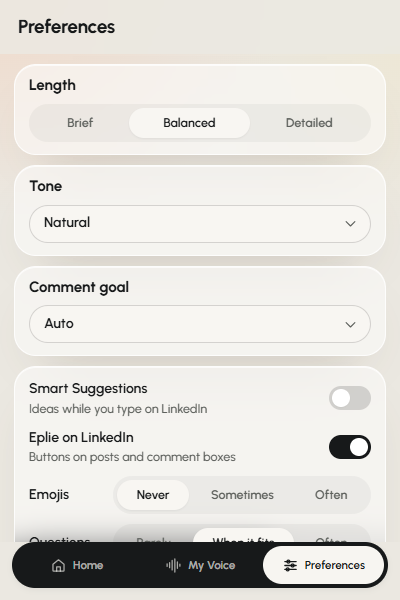
- Length: Brief, Balanced or Detailed.
- Tone: Auto, or one of seven tones.
- Goal: add value, ask a question, share experience and more.
- Emojis: Never, Sometimes or Often.
- Questions: how often they appear.
- Custom instructions: your own writing rules.
Why it matters: Different conversations need different approaches, without making the process complicated.
Explore comment preferences
Emily Carter · 2nd
Co-founder at Northwind
1h ·
We just reached our first 100 paying customers.
Example. People and posts in these demos are made up.
Everything happens inside LinkedIn
Less copying. Less pasting. More time for the conversation.
Generate a draft, improve your own wording, reply to someone, or get suggestions as you type, right where you already write comments. No separate document, no other chat window.
And Eplie doesn't publish anything for you. You review the response, decide whether it represents your opinion, and click Comment yourself.
How Eplie works
Start writing better LinkedIn comments in three steps
- 1
Install Eplie
Add the Chrome extension, sign in, and set up My Voice and your preferences.
- 2
Open LinkedIn
Find a post or conversation you want to respond to.
- 3
Write your way
Generate a comment, reply to a thread, improve your own draft, or use Smart Suggestions while typing. Review the wording and publish it yourself.
You have something worth saying. Eplie helps you say it.
Start with an AI draft, write with suggestions, or improve your own words. All inside LinkedIn.
Eplie is an independent product and is not affiliated with or endorsed by LinkedIn.